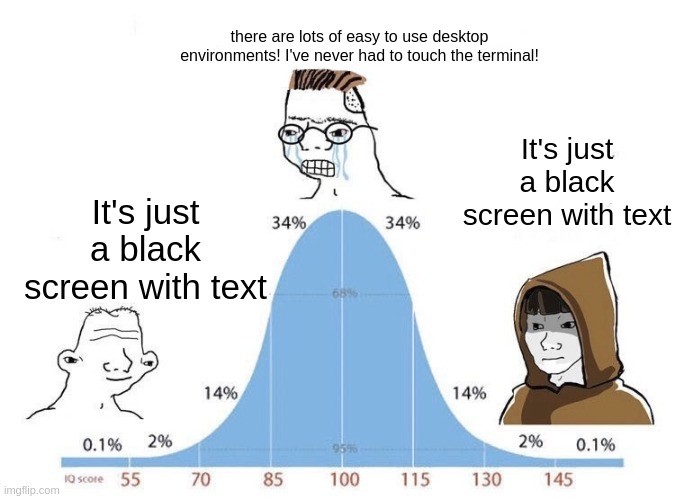
I feel like the meme got it backwards. People fussing over WMs in the middle, while newbies and veterans just using whatever comes by default on Fedora
I don’t wear hats cos am busy using debian
Maybe you could wear a Fedora.
I have a beautiful head of hair. I don’t need no hat.
Meanwhile myself using Arch btw

What comes default on fedora KDE spin
Literally cured my distro hopping
I stayed on it for many years, but Bazzite stole my heart
It probably has a lot of benefits but I don’t think I could ever get used to immutable linux distros, especially since I really like customisability (I use Gentoo for a reason!!)
Yeah that was my thought too, but it turns out it was a misconception. It’s perfectly customisable, I can install whatever I want in multiple ways without messing up my system. Right now I’m running IDEs with multiple compilers, LLMs, diffusion models, 3D printing slicers, 3D modeling, etc…
I’m considering trying Bazzite on a living room PC I’ll be setting up soon (HP Ryzen SFF that’s basically a small desktop Steamdeck)
I’ve installed it on both my desktop and laptop, and I’m rather satisfied
Bugs.
Less so than Windows, but still more than most DE.
Sure
Using Fedora without codecs?
Honestly yes. A few years ago when I was still getting into linux I’d customize the shit out of everything, wm with lengthy configuration, mostly terminal apps, “minimal” ui with custom made themes, and all that.
My current fedora system is almost default Sway with a few convienent shortcuts and a few tweaks, using GUIs where it makes sense or simply because I just want something nice. I just don’t have time or the need for something so customized. Defaults are good.
Heck, I’m even considering switching to Plasma once I get a better PC (gonna need to sell a kidney or two for that to happen tho), since default Sway still requires considerable tweaking and there’s a few quirks I just don’t want to deal with.
I started on xfce because people said it was good for old systems. Turns out plasma runs fine on everything I’ve tried from the last 15 years!
I’ve heard so too. Might be worth giving Plasma a shot on my current shitbox of a laptop to see if it can handle it. Though that thing (about 6 years old, btw) chokes on anything that involves graphics, so I don’t have any high hopes
Edit: After a few weeks, tried out Plasma on my Fedora setup. Really liked it, everything worked out of the box, feels like using the good parts of the windows ui without the bad parts, just a few small issues here and there (keyboard didn’t work on the lock screen like once or twice). Sadly, the laptop is too crap to run it, constant swapping on zram, everything fell sluggish, it froze once even.
Good luck!
Yeah, KDE is “bloated”, but all that means is that there’s some stuff bundled that purists aren’t interested in. It doesn’t seem to affect the speed at all.
Too often I see desktops where the only two graphical apps are some ultralight terminal and Mozilla. Why do they want to suffer?
Fuck Linux
All my homies use FreeDOS
Fuck FreeDOS
All my homies use Plan9
Fuck plan9
All my homies use EFI SHELL
In defense of the creators of Unix, you cannot fuck plan9.
I have a pocket pussy that uses plan9 for its OS
Fuck EFI SHELL.
All my Amish brothers and sisters use a Typewriter.
Friend of Luke smith I see.
Everything on Qubes
Ok I was kidding I actually love my systemdOSd it runs seamlessly on my IBM systemdbookd so fuck FreeDOS and everything else cause they aren’t d
Not all terminals are black!!
I would say we should burn the light-mode heritics, but they’ve already done it to their own eyes.
*heretics
And I wouldn’t be so sure that light mode is more harmful than dark mode and not vice versa.
Depends on the ambiental conditions and the brightness; If you use dark mode outside? That’s kinda on you if you get eye strain
I miss the in-between default color scheme of Win95-XP. It felt like someone had actually sat down and thought about visibility and utility, even if the widgets did look overly utilitarian.
GUI has the fundamental advantage that you can mostly find your way around without having to know commands, syntax, file paths etc. That’s a huge advantage for the vast majority of users.
yea as much as like using the command line, I’m having a hard time remembering all the options required, especially with things i use rarely. the discoverability is just better in GUIs
Discoverabilty is the point. That’s what a GUI excels at. The focus of the terminal is “expressiveness” (I think that’s the commonly used word). It is usually clear when you need one vs the other: bulk or compound tasks, repetitive tasks, or very particular tasks are where the terminal excels.
It sounds like you might benefit from man or tldr as a sidenote. Most people know man, but tldr is also a nice to have.
yeah tldr is great. and the idea of expressiveness vs discoverability is something I’ve to think about. thanks!
but i was more thinking about things like using ps2pdf to reduce the size of scanned (xsane) pdfs. remembering that ps2pdf can do this is difficult for me. i have my notes but it’s still cumbersome.
plus: most people learn graphically (visually) much easier than text-based. at least for me, it’s much easier to build an intuition of something if i get a graphical display of the contents in a directory. that’s why i always
ls -alhevery new directory that i enter, before i do anything else. for many people, it’s better to use GUI file explorer because you also get image previews etc. but the same concept also applies to other issues:like, if you want to configure various hardware on your machine, you open the settings app and get many icons that you can click on. meanwhile, on the terminal, there’s no clear list of things that you can even configure.
Somehow I am all three of these people at the same time.
Why is it constantly booting to a black screen with text?
This is easy, just install steam and go
Ahh the beauty of this Debian server, don’t even need to get out of my sofa because I have SSH on my phone.
The HTC Dream was the peak of Phone SSH.
There was no key combo I couldn’t input, no vim mode I couldn’t use!
There was a VNC client! I could RDP to Windows machines!
I could have even used EMACS!
I mean, I wouldn’t, I’m not some kind of monster, but I could have, and that’s what’s important!
I think it’s just been stigmatized by society as a whole for some mysterious reason. Didn’t a lot of our grandmothers slashed through terminals like fruit ninjas back in the day?
Heck yeah they did! I remember going over to my grandmothers house to use Word on her computer running DOS. She used that computer to keep her personal budget, do the accounting for her office supply business, write letters, and the newsletters for her church and social clubs. No gui, just a command line and some things that we would now call a TUI.
It was stigmatized by Windows, because the Windows terminal was terminally shitty. People swear to me that their new terminal is awesome, but I have my doubts. Microsoft seems to have a problem with making stuff that doesn’t suck.
My dream is the Linux kernel with the BeOS/Haiku filesystem and display system on top. It could easily put Wayland to shame and gaming would be pretty awesome.
My other dream is Haiku having as much hardware and software support as modern Linux. Imagine running a version of qemu kvm on an os that already screams.
Neither will happen but I can still wish.
It’s still somewhat early days, but you might want to check out https://v-os.dev/
I’ve also been playing with Haiku on an old laptop and it’s pretty decent as a daily driver for the basics.
Omg this is so peak gonna be my next distro hop fixation.
They are about to get a lot of github pull requests
Can you explain why are you fond of haiku? What are it’s strong points?
I had it in a VM, and liked the UI design. It was retro and unique. but that’s about it.
the big one for me is tagged filesystems. they exist on other oses but beos embraced them fully, and haiku does the same.
“music” is no longer a directory, but a view of your filesystem that shows everything tagged “music”. you want everything from an artist, or a year, or a genre? just create that directory and they’re in there.
Hmmmm. The tagging approach seems interesting.
Turns fs structure from tree hierarchy to graph hierarchy
The filesystem is basically a database and files have associated metadata like a description or whatever, searches are nearly instant. The email app for example uses this, I’ve never seen anything even come close to how well this worked.
Under the hood it uses a server model for pretty much everything.
The programming APIs are elegant.
There’s a lot to it you wouldn’t have noticed immediately by just starting it and opening a few apps.
its a very solid and user friendly gui/desktop oriented operating system
GUI is simpler because you have to remember a sequence of steps for every action you want to take and then memorize a bunch of keyboard shortcuts and then do it all again when they reinvent their product in two weeks.
CLI requires you to learn how your system is structured and where things are located and then you create scripts that last years. Not everyone wants to put in a bunch of effort just to use their computer.
Anyways Firefox just updated and they moved “save to collection” and a few other things so now I need to relearn some stuff. I hope my other apps don’t reinvent themselves anytime soon. Every update I know how to use them less and less.
A regular user will never in a million years create a script.
I think that depends how you define “regular user”.
(I assume this is like regulars in a “well regulated militia” right?)
With ai they can
And now they have bricked their computer.
i used AI last week to modify the characters that get produced when i type special key combinations on my keyboard. after looking with classical search engines (duckduckgo, google) for about 20 minutes and getting confused with not much of a clear answer, i asked chatgpt and got the task done in 15 minutes and learned a whole lot while doing it, because it also explained exactly why the files are the way they are.
Me, not being a programmer or sysadmin or whatever, booting into TTY just for shits and giggles, playing videos via mpv with -vo=tct just cause I think it looks funny
my poor cpu. You don’t even need to use
-vo=tctas mpv will draw to the frame buffer if x server is not available. There’s also fbi and fbpdf for displaying images and pdfs to the frame buffer
TUI enjoyer 😏
I’m a CLI enjoyer. It’s easier for me to define what I often do as a bash function than to remember which button to click in a GUI app. It’s easier for me to copy paste a StackOverflow answer than to zoom the screenshot only to find out that the UI has changed. And I’m too lazy to move my mouse when I can do it with a Neovim keymap.
I can’t use Linux, it’s too hard!
The whole idea of someone not being sure if they want to use Linux while having an aversion to systemd, a system they likely don’t even have full context for, is just bizarre.
You’re either new and don’t know what you want or you’re someone who already knows well enough if Linux is for you or not, and likely exactly which version you want to use.
Exactly. The only thing a new user is really going to care about or even notice is if their hardware is well supported in first install and that the desktop environment feels like what they are used to. All of the fighting about things like systemd, snap, flatpak, deb vs rpm, etc are somewhere between a distraction and scary sounding words.
yeah, my first boot into KDE Plasma (technically Linux Mint/ Cinnamon) brought me the strange inner peace that i am now used to when I decided to try Windows vista on an old PC (at least the first few minutes, you really can’t do anything without a graphics card).
Someone could just read into it regardless of what OS they’re on and decide from there if they want systemd or not.
Right, but if they’re technically advanced enough to care about system management at that level, they really can’t expect a comfortable and easy introduction. Hence the point of them already knowing what they want by that point.
I know you’re trying to be helpful, but I clicked the link, sure that I was ready. Now I’m scared again.
I’ve got a laptop to give it a go. Gonna save the good files and let err rip. It always comes down to just wanting something that works. I really would rather learn something else with my limited spare time.
Still scared. Getting closer to making the switch every day though.
Linux Mint is the most “just works” distro I’ve used, fwiw. It is scary to finally take the plunge, but you’ll be glad you did.
Bruh, just use any mainstream distro with KDE. It’s really a lot easier than the tutorials make it look.
I tried a few distros but eventually settled on mint because it largely just works for me
Oh Im deeply aware those exist. My daily is Debian Stable.
Can’t and don’t want to are two different things.
the issue with the terminal is that you can easily fuck up really badly if you don’t know what you’re doing.
the following look the same to a new user:
rcifconfig -r 0 -f puny -l allrctrl -r all -i root -f(both are imaginary made-up comments sothat you cannot just say "oh well obviously one does this and the other one does that)
then one goes on to nuke your home directory while the other one restarts the wifi adapter.
(and this can actually happen in practice. consider all the “always remove the french language pack” jokes that has been going around for years.)
for graphical user interfaces, you typically have icons to help you give a sense of what it’s doing, typically warning signs before you do anything dangerous, etc.
I’ve heard the jokes about
rm -rf /. I’ve never met anybody who’s taken it seriously and nuked their system.That command is legendary. It’s one of the first bits of computer lore I ever learned, about 10 years before I ever touched Linux. In fact, at that time I knew two things about Linux: it’s a free OS and don’t do
rm -rf /.Of course you should do some research first, so that you’re sure that you know what a command does, but if you’re getting it from a forum like Stack Overflow or even reddit, you can be reasonably sure that if the commenter was trying to destroy your computer they’d get downvoted and one of the other commenters would warn you about it. Don’t treat Linux like it’s some kind of minefield that you have to tiptoe around. It isn’t conducive to learning.
I think the real issue with the modern terminal, and Linux in general, is that we are using tools designed for programmers and system admins, who are expected to know exactly what they are doing, to build and run servers and treating them like they are end user tools. My grandmother was perfectly happy using a terminal for the only computer she owned because the tools it provided were simple and had those built in protections in a way that bash never will be.
Terminal gang!
It does everything you need with ONE exception I’ve found: if you use it for your file manager (I do) and you find that you need to quickly select a few items based on image preview, it is not great. Now you can solve this with vifm or something, or just launch dolphin or something every once in awhile.
I use the terminal for terminal shit. File manager is not terminal shit (for me).
I usually open the terminal in my WM, then decide what I’m going to do. Force of habit
Have you used a terminal file manager with image preview like yazi? Or just a thumbnail viewer like lsix?
I didn’t know a thumbnail viewer existed, I will have to try. Historically I have used sxiv in tabbed mode and just tried to remember filenames which is obnoxious.
Oof, yeah that’s hard. yazi is a full tui file manager that can do image and other file previews, so you can flip through a directory, mark the files you want to move/delete/whatever, then hit the command to do it. lsix is basically ls for images, it generates and displays thumbnails for each file. Or can just do it from emacs.